Enable Room Type Changes Outside the Current Rate Plan
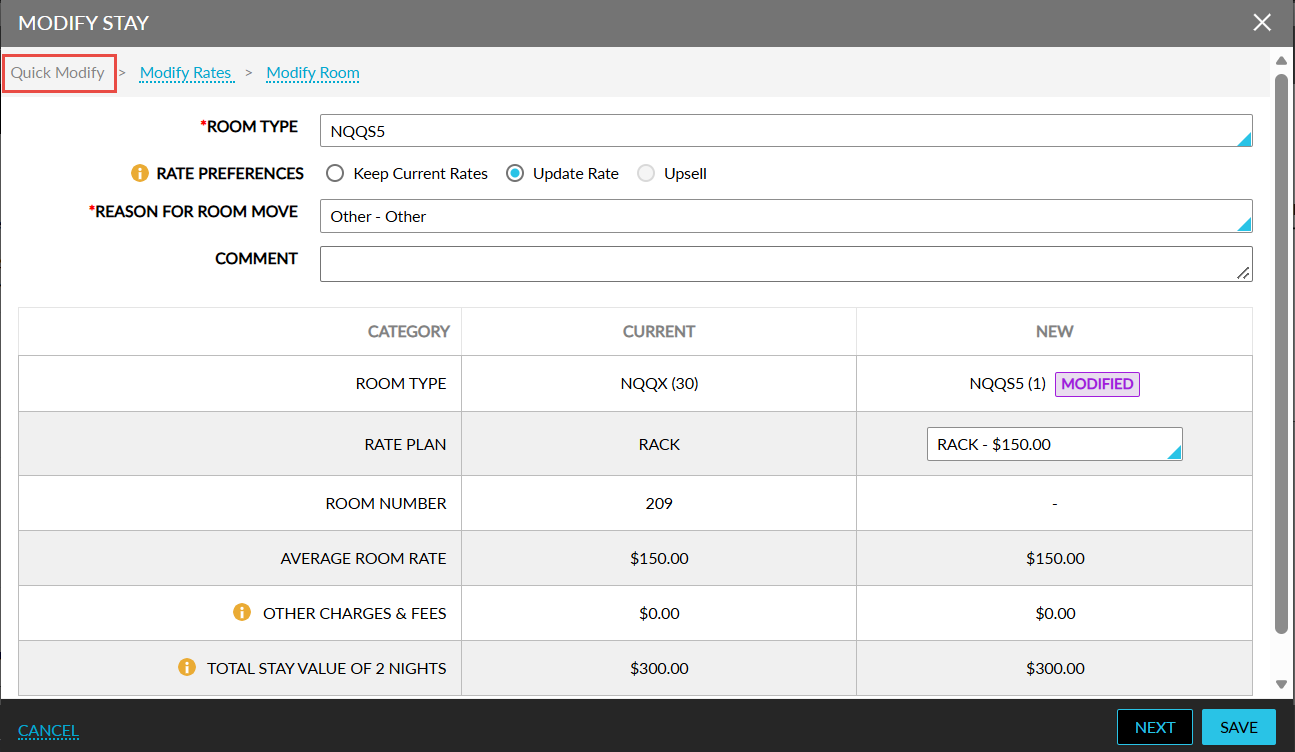
Stay is enhanced to simplify room type modifications by introducing an enhanced Quick Modify experience. That is, when choosing how rates must be handled during the modification, users can change the room type even when the selected room type is not included in the current rate plan.
To support this enhancement, the existing Summary section in the Modify Stay pop-up screen has been renamed to Quick Modify, and the separate Change Room Type pop-up screen has been removed. Room type selection is now available directly within the Modify Stay screen, providing a faster and more streamlined experience.
When modifying a reservation, users can perform the following actions:
-
Select from all active room types available in the property.
-
Search for room types and rate plans.
-
Apply a selected room type to the entire stay.
-
Choose how rates must be handled when changing room types.
Rate Preference Options
A new Rate Preference field is available in the Quick Modify tab with the following options:
-
Update Rate (Default)
-
Keep Current Rates
-
Upsell
Update Rate (Default)
Selecting this option updates the reservation rates based on the selected room type.
-
When the selected room type is available under the current rate plan, the current rate plan is automatically selected and the rates are recalculated.
-
When the selected room type is not available under the current rate plan, users can choose another available rate plan for the selected room type.
-
Rate details, including average room rate, other charges, and total stay value, are updated automatically based on the selected room type and rate plan.
When the selected room type is not available under the current rate plan, the following message is displayed: The selected room type is not available under the current rate plan. Choose another room type or rate plan to modify the stay, or select "Keep Current Rates" to retain the existing rates.
Keep Current Rates
Selecting this option allows users to change the room type while retaining the existing reservation rates. When is option is selected, the following actions occur:
-
The current rate plan remains unchanged.
-
The current rates are retained for the reservation.
-
Room type changes are allowed even when the selected room type is not included in the current rate plan.
-
The rate plan cannot be changed when this option is selected.
Upsell
Selecting this option allows users to move to an eligible upsell room type without changing the existing rate plan. When available, Stay automatically applies the applicable upsell pricing and room assignment rules defined for upsell room classes.
Rate Plan Summary
A new category, Rate Plan, has been added to the Rate Summary table that displays the following details:
-
The current rate plan assigned to the reservation.
-
Available rate plans for the selected room type.
-
Average room rates associated with available rate plans.
Users can search available rate plans directly from the drop-down list displayed in the New column. Only rate plans available for the selected room type throughout the stay are displayed. When a new rate plan is selected in the Quick Modify section, it is automatically applied to the entire reservation.
Modify Rates
When modifications are performed in the Modify Rates tab, the room type, rate plan, and rate preference selections in the Quick Modify tab become unavailable and the following message will be displayed: Reset the changes made in the "Modify Rates" section to continue with quick modification.
When users click Reset, all modifications are removed and the reservation is restored to its default state.
Reservations with Multiple Room Types or Rate Plans
For reservations containing different room types or rate plans across the stay, the Quick Modify section is not available by default. Room type, rate plan, and rate preference changes cannot be made until the reservation uses a single room type and rate plan across all nights. The following message will be displayed to indicate this: Quick Modify is unavailable because this reservation uses different room types or rate plans on some nights. Please modify the stay with the same room type and rate plan for all nights to continue.